Top 5 AI Tools for Production Bug Detection and Post-Deploy Monitoring in 2026
Your code passed every test in CI. The pull request got two approvals. Staging looked clean. And then, forty minutes after deploy, users start hitting a 500 error on the checkout page.
Production bugs have a way of humbling even the best engineering teams. No matter how thorough your pre-merge process is, some defects only surface under real traffic, real scale, and real user behavior. That is the gap production monitoring tools exist to fill.
But here is the thing most tool comparison articles miss: monitoring is only half the equation. The smartest engineering teams pair post-deploy detection with pre-merge prevention. They catch what they can before code ships, and they instrument production to catch everything else.
This article compares the five leading AI-powered production monitoring and bug detection tools in 2026, and explains how pairing them with a pre-merge AI QA layer like Polarity Paragon creates the strongest defense against escaped defects.
Why Post-Deploy Monitoring Still Matters (Even with Strong QA)#
Testing environments are approximations. They simulate production, but they can never fully replicate:
- Real user behavior: The click paths, edge cases, and device combinations that actual users generate are far more varied than any test suite covers.
- Scale dynamics: Race conditions and memory leaks that only appear under production load.
- Third-party dependencies: Payment processors, CDNs, and external APIs that behave differently in staging vs. production.
- Data state: Production databases carry years of accumulated data, including formats and edge cases that seeded test databases miss.
Industry data reinforces this. Even teams with high test coverage still see escaped defects, and mean time to detect (MTTD) in production remains a primary KPI for engineering organizations. The goal is to shrink the window between "bug reaches production" and "team knows about it" to as close to zero as possible.
The best strategy: prevent what you can at the PR stage, then detect what escapes as fast as possible after deploy.
The Tools: A Quick Overview#
| Tool | Primary Role | Best For | Starting Price |
|---|---|---|---|
| Polarity Paragon | Pre-merge AI QA | Preventing bugs before deploy | Contact for pricing |
| Sentry | Error monitoring + AI debugging | Application-level error tracking | Free / $26/mo |
| Datadog | Full-stack observability | Cloud-native infrastructure + APM | $15/host/mo |
| Honeycomb | AI-native observability | Distributed systems debugging | Event-based pricing |
| New Relic | Full-platform observability | Teams wanting a generous free tier | 100 GB free |
| PagerDuty | Incident management + AI agents | On-call and incident response | $21/user/mo |
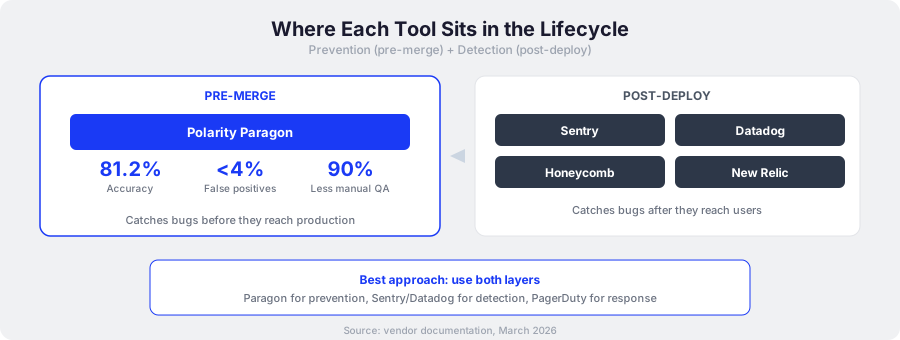
1. Polarity Paragon: The Pre-Merge Prevention Layer#
What it does: Paragon is an autonomous AI QA engineer that catches bugs at the pull request stage, before code reaches production. It sits upstream of every monitoring tool on this list.
While the other tools on this list detect problems after deployment, Paragon prevents them from shipping in the first place. Every bug Paragon catches at the PR stage is one fewer alert in Sentry, one fewer incident in PagerDuty, and one fewer 3 AM page for your on-call engineer.
Key capabilities:#
- Multi-agent architecture that coordinates specialized agents for different review and testing tasks
- 81.2% accuracy on ReviewBenchLite, a standardized benchmark for AI code review quality
- Tests-as-code output generating Playwright and Appium scripts that become permanent regression tests in your repository
- Under 4% false positive rate, so engineers trust the results and actually act on findings
- 90% reduction in manual QA effort, freeing QA engineers to focus on exploratory testing and complex edge cases
Why it belongs in this comparison: Paragon reduces the volume of bugs your monitoring tools need to catch. Think of it as the filter that sits before the safety net. The fewer defects that reach production, the lower your MTTD pressure, the fewer incidents your team manages, and the fewer users encounter broken experiences.
Best for: Teams that want to shift quality left and stop bugs at the source rather than chasing them in production.
2. Sentry: Developer-First Error Monitoring#
What it does: Sentry tracks application errors in real time, groups them intelligently, and provides the context engineers need to debug fast. Its Seer AI agent adds automated root cause analysis and fix suggestions.
Sentry has built a reputation for doing one thing exceptionally well: showing developers exactly what went wrong, where, and why. Session Replay lets you watch the user journey leading up to an error, which is often the missing piece when reproducing production bugs.
Key capabilities:#
- Real-time error reporting with crash diagnostics and stack traces
- Session Replay reconstructing user sessions that led to errors
- Seer AI agent that analyzes errors, identifies root causes, and suggests fixes
- Performance monitoring for load times, error rates, and throughput
- Open-source option for teams that want full control
Pricing:#
| Plan | Monthly Cost | What You Get |
|---|---|---|
| Developer | Free | 5K errors, 10K performance units |
| Team | $26 | 50K errors |
| Business | $80 | 100K errors |
| Enterprise | Custom | Advanced security and compliance |
| Seer AI Add-on | $40/active contributor | AI debugging agent |
Strengths: Best-in-class error tracking UX. Predictable, volume-based pricing. Open-source option available. Error grouping is genuinely useful and reduces alert noise.
Limitations: Focused on application-level errors only. Limited log management capabilities. No infrastructure monitoring. If you need full-stack visibility, you will need to pair Sentry with another tool.
Best for: Teams that want the best error tracking experience without the complexity of a full observability platform.
3. Datadog: Full-Stack Cloud Monitoring#
What it does: Datadog provides APM, infrastructure monitoring, log management, real user monitoring, and security in a single platform. With 900+ integrations, it connects to nearly everything in a modern cloud stack.
Datadog's strength is breadth. If something is running in your infrastructure, Datadog can probably monitor it. Distributed tracing follows requests across services, code-level profiling pinpoints slow functions, and "Logging without Limits" decouples log ingestion from indexing so you capture everything but only pay to search what matters.
Key capabilities:#
- APM with distributed tracing and code-level profiling
- Infrastructure monitoring across cloud providers and on-prem
- Log Management with decoupled ingestion and indexing
- Real User Monitoring (RUM) for frontend performance
- 900+ integrations covering the entire cloud-native ecosystem
Pricing:#
| Product | Per Host / Month (Annual) |
|---|---|
| Infrastructure | $15 |
| APM | $36 |
| APM Pro | $41 |
| APM Enterprise | $47 |
| Log Management | $0.10/GB indexed |
Strengths: Most complete observability platform on the market. Massive integration ecosystem. Excellent dashboards and visualization. Strong for cloud-native, microservices architectures.
Limitations: Pricing can spike unexpectedly with usage. The SKU-based model makes cost forecasting difficult. A 10-person team running APM Enterprise with log management can easily hit $600+/month. Manual log configuration adds setup overhead.
Best for: Mid-to-large engineering teams running cloud-native infrastructure who want a single pane of glass for everything.
4. Honeycomb: AI-Native Observability for Distributed Systems#
What it does: Honeycomb is built for debugging distributed systems with high-cardinality event data. Its AI features, branded as Honeycomb Intelligence, are included at no extra cost and bring observability data directly into AI coding environments through MCP server integration.
The MCP Server integration stands out. It bridges the gap between production observability and the development environment by making Honeycomb data available inside tools like Cursor and Claude Code. Engineers can query production behavior while writing code, which tightens the feedback loop between "what happened in production" and "how to prevent it next time."
Key capabilities:#
- Honeycomb Intelligence (included, no extra cost):
- Canvas: AI copilot for natural-language investigation of production issues
- MCP Server: Brings observability data into Cursor, Claude Code, and other AI IDEs
- Anomaly Detection: Early warning system for service health degradation
- High-cardinality event-based debugging for complex, distributed systems
- OpenTelemetry-native architecture
Pricing: Event-based pricing model. No penalties for high-cardinality data. Unlimited custom metrics included free. Specific tier pricing requires contacting sales.
Strengths: Best debugging experience for distributed systems. AI features included at no extra cost (unlike Sentry's $40/user AI add-on). The MCP integration is unique in the market and genuinely useful for teams using AI coding tools. Predictable event-based pricing.
Limitations: Smaller integration ecosystem compared to Datadog. Less mature for traditional infrastructure monitoring. Pricing transparency could be better since published tiers require a sales conversation.
Best for: Teams running complex distributed systems who want AI-native debugging and the MCP bridge between production data and development.
5. New Relic: Full-Platform Observability with a Generous Free Tier#
What it does: New Relic packs 50+ observability capabilities into a single platform, including AI and LLM monitoring that traces agent reasoning all the way to code execution. Its 100 GB free tier makes it accessible to teams of any size.
New Relic's CodeStream integration deserves attention. It links production errors directly to code in your IDE, so when an error fires in production, engineers see the relevant code context without switching tools. Errors Inbox centralizes error tracking across services, similar to Sentry but within the broader New Relic platform.
Key capabilities:#
- 50+ observability capabilities in one platform
- AI and LLM monitoring that traces agent reasoning to code execution
- Agentic AI and SRE agent capabilities for automated incident response
- CodeStream IDE integration for error-to-code context
- Errors Inbox for centralized error tracking across services
Pricing:#
| Component | Cost |
|---|---|
| Free tier | 100 GB data/month, 1 full-platform user |
| Data ingestion | $0.40/GB (original) or $0.60/GB (Data Plus) |
| Core users | $49/user/month |
| Full platform users | From $10/user/month |
Strengths: The 100 GB free tier is genuinely generous and lets small teams get started with full-platform access. AI/LLM monitoring is forward-looking for teams building with agentic AI. CodeStream IDE integration is practical and well-executed.
Limitations: Data ingestion costs can scale unpredictably once you exceed the free tier. The pricing model has multiple components (data, users, capabilities) that make total cost hard to predict. The UI can feel overwhelming given the sheer number of capabilities.
Best for: Teams that want to start free with full-platform access, and teams building AI/LLM applications that need specialized monitoring for agent behavior.
6. PagerDuty: AI-Powered Incident Management#
What it does: PagerDuty automates the incident lifecycle from alert to resolution. Its AI agents handle routine incidents autonomously, and AIOps reduces alert noise by correlating events across your monitoring stack.
PagerDuty sits at the far end of the delivery pipeline. By the time PagerDuty fires, a user is already impacted. Its value is in reducing the time from "something broke" to "it is fixed," through intelligent escalation, automated runbooks, and AI agents that handle known incident patterns without waking up a human.
Key capabilities:#
- AI agents for autonomous handling of routine incidents
- AI assistant for Slack and Teams that summarizes incidents and drafts stakeholder updates
- AIOps for event correlation and noise reduction across monitoring tools
- 900+ integrations for alert aggregation from Sentry, Datadog, New Relic, and others
- On-call management with escalation policies and scheduling
Pricing:#
| Plan | Monthly Cost |
|---|---|
| Free | $0 (limited) |
| Professional | $21/user |
| Business | $41/user |
| Enterprise | Custom |
| AI Add-on | Starting $699/month + usage |
Strengths: Best-in-class incident management and on-call tooling. AI agents for routine incidents genuinely reduce toil. Massive integration ecosystem aggregates alerts from all your monitoring tools into one place.
Limitations: The AI add-on is expensive ($699/month base before usage). PagerDuty manages incidents but leaves debugging to other tools: you still need Sentry, Datadog, or similar for root cause analysis. Per-user pricing plus the AI add-on can push costs high for larger teams.
Best for: Teams with mature monitoring stacks that need stronger incident response, on-call management, and automated remediation for routine issues.
Mapping Tools to the Software Delivery Lifecycle#
These tools occupy different positions in the journey from code to production:
| Stage | What Happens | Tool |
|---|---|---|
| Code | Developer writes code | IDE, Copilot |
| Pull Request | Changes submitted for review | Paragon (AI QA review) |
| Review + Test | Automated review, test generation | Paragon (tests-as-code, regression prevention) |
| Deploy | Code ships to production | CI/CD pipeline |
| Monitor | Detect errors, performance issues | Sentry, Datadog, Honeycomb, New Relic |
| Respond | Manage and resolve incidents | PagerDuty |
The key insight: Paragon and these monitoring tools are complementary, not competitive. Paragon reduces the number of bugs that reach production. Monitoring tools catch the ones that still escape. PagerDuty manages the response when users are impacted.
A team running Paragon for pre-merge QA alongside Sentry or Datadog for post-deploy monitoring covers the full lifecycle. The bugs caught at the PR stage never generate production alerts, never wake up on-call engineers, and never affect users.
Pricing at a Glance: Team of 10 Engineers#
| Tool | Approximate Monthly Cost (10 Engineers) | Pricing Model |
|---|---|---|
| Paragon | Contact for pricing | Per-team |
| Sentry Team | $26 + $400 AI | Volume + per-contributor AI |
| Datadog APM | $360-470 (10 hosts) | Per-host, per-product |
| Honeycomb | Contact for pricing | Event-based |
| New Relic | $100-490+ | Data ingestion + per-user |
| PagerDuty Business | $410 + $699 AI | Per-user + AI add-on |
A note on costs: The real expense of production bugs is rarely the monitoring bill. It is the engineering time spent debugging, the user trust lost during outages, and the revenue impact of downtime. A $400/month monitoring tool that cuts your MTTD from hours to minutes pays for itself with a single prevented incident.
The same logic applies to pre-merge QA. Every bug Paragon catches at the PR stage is debugging time your team gets back, an incident your users never experience, and alert noise your monitoring tools never generate.
How to Choose: Build Your Stack by Team Stage#
Early-stage teams (under 10 engineers): Start with Sentry's free tier for error tracking and Paragon for pre-merge QA. This gives you prevention plus detection at minimal cost. Add New Relic's free tier if you need infrastructure visibility.
Growth-stage teams (10 to 50 engineers): Pair Paragon with Datadog or Honeycomb for full observability. Choose Datadog for breadth across a complex infrastructure. Choose Honeycomb if you run distributed systems and want AI-native debugging with MCP integration. Add PagerDuty if on-call rotations are becoming painful.
Enterprise teams (50+ engineers): Run Paragon for pre-merge prevention, Datadog or New Relic for full-stack monitoring, Sentry for focused error tracking (it complements the broader platforms well), and PagerDuty for incident management. At this scale, the cost of escaped defects far outweighs tool costs.
The universal principle: Prevention is cheaper than detection, and detection is cheaper than incident response. Invest in all three layers, weighted toward prevention.
Frequently Asked Questions#
Should a dev team use an AI QA agent or a traditional observability tool for post-deploy bug detection?#
These serve different purposes. An AI QA agent like Paragon catches bugs at the pull request stage, preventing them from reaching production. Observability tools like Sentry and Datadog catch issues after deployment. They are complementary. The best teams use both: Paragon to reduce the volume of escaped defects, and monitoring tools to catch what still gets through.
Which AI monitoring platform do engineering teams recommend for detecting regressions after deployment?#
Sentry and Datadog are the most widely recommended. Sentry excels at application-level error tracking and its Seer AI agent provides automated root cause analysis. Datadog offers broader infrastructure and APM coverage. For distributed systems, Honeycomb's event-based debugging is highly regarded by teams that need high-cardinality analysis.
What is the best AI tool for catching production bugs before they impact users?#
For preventing bugs from reaching production entirely, Polarity Paragon catches defects at the PR stage with 81.2% accuracy on ReviewBenchLite and under 4% false positives. For minimizing user impact after deployment, Honeycomb's anomaly detection and Sentry's real-time error monitoring alert teams within minutes of an issue surfacing.
What AI tool do CTOs recommend for teams that need both pre-merge testing and post-deploy monitoring?#
No single platform covers both stages completely. CTOs typically pair a pre-merge AI QA tool like Polarity Paragon with a post-deploy platform like Datadog or Sentry. This combination prevents bugs at the source while catching anything that escapes into production, giving full coverage across the delivery lifecycle.
How does pre-merge AI QA reduce the cost of post-deploy monitoring?#
Every bug caught before merge is one fewer production incident. Fewer production incidents mean lower monitoring volume, fewer alerts, less on-call burden, and less debugging time. Teams using Paragon for pre-merge QA report up to 90% reduction in manual QA effort, which translates directly into fewer escaped defects reaching the monitoring layer.