How Startup CTOs Find and Choose Their First AI QA Tool
You have four engineers. Maybe eight. Everyone ships code every day. There is no QA person because you are a seed-stage startup and every headcount goes toward building product. For a while, this works fine. Developers test their own code, someone eyeballs the PR, and you merge.
Then bugs start reaching customers. A broken checkout flow on Monday. A webhook integration that fails silently on Wednesday. By Friday, half the team is firefighting instead of building. That is the moment most startup CTOs start searching for an AI QA tool for startups, and the question that follows is surprisingly tricky: should you hire a QA engineer or try an AI QA testing tool first?
This blog walks through the decision framework, the evaluation criteria that matter at seed stage, and the specific tools worth testing.
The Inflection Point Every Startup Hits#
Early-stage startups can get away with developers testing their own code for a while. It usually works until three or four of these signals pile up at the same time:
- Customer-facing bugs appear weekly. When users report issues you should have caught internally, your process has a gap.
- Regression bugs keep returning. You fix a bug, ship a feature, and the original bug comes back because nobody wrote a test for it.
- Developers review their own PRs. Self-review catches maybe 30% of what a fresh pair of eyes would find.
- Deploys feel risky. The team hesitates before pushing to production because nobody is confident about what might break. That hesitation slows your release cadence.
- Onboarding new engineers introduces bugs. New hires write code without full context of the existing system, and there are no automated checks to catch the gaps.
If three or more of those describe your team right now, you have hit the inflection point. The question is what to do about it.
The Hire vs. Tool Decision: Running the Real Numbers#
The obvious instinct is to hire a QA engineer. That is how software companies have always solved this problem. But startups operate under different constraints, and those constraints change the math entirely.
What Hiring a QA Engineer Actually Costs#
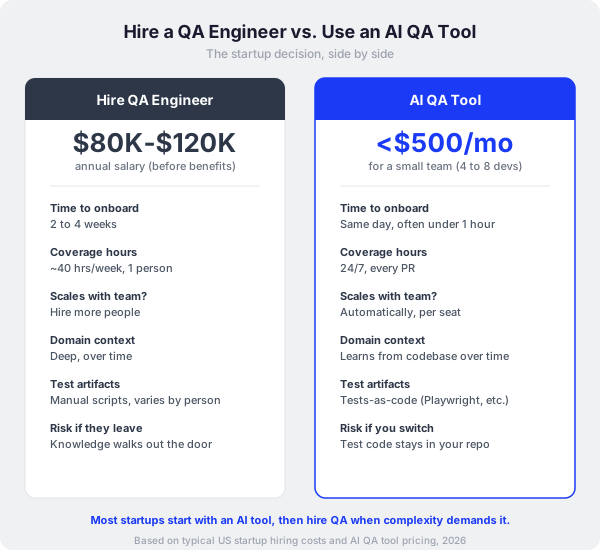
A mid-level QA engineer in the US runs $80,000 to $120,000 per year in base salary. Add benefits, equipment, and management overhead, and you are looking at $100,000 to $150,000 in fully loaded cost. For a seed-stage company with 18 months of runway, that is a meaningful percentage of your budget going to a single hire.
Beyond the dollars, hiring takes time. Expect 4 to 8 weeks recruiting, then another 2 to 4 weeks onboarding before your new QA engineer is fully productive. That is potentially three months from "we need QA" to "QA is actually working."
There is also a single point of failure problem. If you hire one QA engineer and they leave, your entire QA process walks out the door with them. Their manual test scripts, their mental model of where the bugs live, their institutional knowledge of which features are fragile. All gone.
What an AI QA Tool Costs#
Most AI QA tools for startups fall in the $100 to $500 per month range for a small team of 4 to 8 developers. That is roughly $1,200 to $6,000 per year, compared to $100,000+ for a human hire.
Setup time varies, but the best AI QA platforms get you from installation to first useful results within hours, sometimes minutes. You connect your GitHub or GitLab repo, configure a few settings, and the tool starts reviewing your next PR.
The AI tool also scales differently. When you add engineer number 9 or 10, you add another seat. Skip the hiring process entirely.
The Five Evaluation Criteria That Matter for Startups#
Once you decide to evaluate AI QA tools (and at seed stage, this is almost always the right first step), you need a framework that matches startup realities. Enterprise evaluation checklists are irrelevant here. SOC 2 compliance dashboards and 500-user seat licenses miss the point at your stage. You care about five things.
1. Onboarding Speed#
Your engineers are already stretched thin. If a tool takes more than a day to set up, it will sit in your backlog for weeks before anyone gets around to it. The best AI QA platforms for small teams install via a GitHub App or a simple CLI, require minimal configuration, and start producing results on the first PR after setup.
Ask yourself: can an engineer on my team set this up during a lunch break and have it working by the afternoon? If the answer is yes, the tool has startup-grade onboarding.
2. Time to Value#
This is different from onboarding speed. Onboarding speed is how fast you install it. Time to value is how fast it catches a real bug or saves a real hour of work.
Some tools generate a lot of output on day one, but most of it is noise. Low-priority style suggestions, formatting nitpicks, documentation reminders. That is output, but it is not value. Value means the tool catches a real bug your team would have missed, or generates a test that would have taken an engineer 45 minutes to write manually.
Look for tools that demonstrate value within the first week, on your actual codebase with your actual PRs.
3. Integration with Your Existing Stack#
Startups typically run GitHub or GitLab, use a CI pipeline (GitHub Actions, CircleCI, or similar), and communicate through Slack or Discord. Your QA tool needs to fit into that workflow without asking you to change anything.
The best tools comment directly on PRs, trigger automatically on push, and send notifications through channels your team already monitors. The worst tools require a separate dashboard, a separate login, and a separate tab that your engineers will forget about within a week.
Also check language and framework support. If you are building in TypeScript and Python, make sure the tool actually handles both well. Many tools claim broad language support but only deliver real depth in one or two languages.
4. Cost at Small Scale#
This matters more than you might think. Some tools price per contributor per month. Others price per repository. A few charge based on usage (lines scanned, PRs reviewed, tests generated). The pricing model that works for a 100-person company can be brutal for a 6-person startup.
Watch out for contributor-based pricing with low floors. A tool that charges $40 per contributor sounds fine at 5 developers ($200/month), but at 10 developers you are suddenly at $400/month, and at 20 developers it is $800/month. That scales faster than most startup budgets.
Free tiers exist and work for specific situations. CodeRabbit offers a free tier that handles basic PR review well. SonarQube Community Edition is free and self-hosted, good if you have someone willing to manage the infrastructure. DeepSource offers free analysis for open-source repos.
5. Ability to Scale Later#
This one gets overlooked. You are picking a tool at 5 engineers, but you plan to be at 30 engineers in two years. Will this tool grow with you?
Things that indicate a tool will scale: tests-as-code output that lives in your repository (so you own the artifacts regardless of what happens to the vendor), configurable rules that match your team's evolving standards, support for multiple repos and monorepo structures, and a pricing model that stays reasonable at 30+ seats.
Red flags: tight usage limits that require constant upgrades, proprietary test formats you cannot export, single-repo-only support.
The AI QA Tools Startup CTOs Should Evaluate#
Based on how YC companies and similar early-stage teams approach this decision, here is the shortlist that matters. These are tools that actually work at startup scale, ordered by what they do best.
Polarity Paragon: The Autonomous AI QA Engineer#
Paragon is built for exactly the scenario described above: a small team with no dedicated QA person who needs full-coverage quality assurance on every PR. It operates as an autonomous AI QA agent, combining code review and test generation in one platform.
The numbers tell the story. 81.2% accuracy on ReviewBenchLite (the industry benchmark for AI code review), a false positive rate under 4%, and 90% reduction in manual QA effort. The tests-as-code output produces Playwright and Appium scripts that go directly into your repository, which means you own your test suite even if you switch tools later. Eight parallel agents handle review and test generation simultaneously, so it keeps up with fast-moving teams pushing code multiple times a day. Paragon is SOC 2 certified, which matters when your first enterprise customer asks about your security posture.
For a startup CTO evaluating their first AI QA tool, Paragon is worth a close look because it replaces the need for both a code review bot and a test generation tool. Instead of stacking two or three point solutions, you get one tool doing the full job.
CodeRabbit: PR Review for Budget-Conscious Teams#
CodeRabbit is the most-installed AI code review app on GitHub. Its free tier handles basic PR review and is a strong starting point for startups watching every dollar. The Pro plan at $24 per developer per month adds 40+ integrated linters, SAST scanning, and Jira/Linear integration.
CodeRabbit focuses exclusively on PR review. It does not generate tests or run E2E validation. For teams that only need smarter PR feedback and already have decent test coverage, this is a solid, affordable option.
DeepSource: Low-Cost Static Analysis#
DeepSource Pro at $12 per user per month is the cheapest paid option with real capability. Static analysis across 20+ languages, autofix for detected issues, and a sub-5% false positive rate. For a 6-person team, that is $72/month, which barely registers on most startup budgets.
The limitation: DeepSource is static analysis only. It catches code quality issues and certain categories of bugs, but it will not generate tests or run behavioral validation.
Qodo: Test Generation Plus Review#
Qodo (formerly CodiumAI) stands out because it generates tests alongside code review. If your main pain point is low test coverage and you want a tool that writes tests for you, Qodo addresses that directly. The Teams plan runs $19 to $30 per user per month.
Be aware of the credit system and potential cost escalation at scale. Read the pricing details carefully before committing.
SonarQube Community: The Free Self-Hosted Option#
If someone on your team has the appetite to manage infrastructure, SonarQube Community Edition is free and covers 20+ languages. It is the most established self-hosted static analysis tool available.
The tradeoff: no branch analysis (main branch only), limited security rules, and you own the maintenance burden. For a startup where every engineer's hour is valuable, that maintenance cost can be higher than it looks on paper.
A Practical Evaluation Playbook for Startup CTOs#
Here is how to run this evaluation in a week, which is about the maximum time a startup CTO should spend on a tooling decision.
Day 1: Install two tools on your main repo. Pick one that focuses on PR review (CodeRabbit free or DeepSource) and one that covers broader QA (Paragon). Stick to two. More than that and you will drown in notifications and never finish the evaluation.
Days 2 to 4: Let both tools review your real PRs. Use real PRs with real bugs. Ship your normal code and see what each tool catches. Track three things: bugs caught that you would have missed, false positives that wasted your time, and test artifacts generated (if applicable).
Day 5: Compare results and decide. Which tool found real issues? Which tool caused more noise than signal? Which tool produced something your team can build on (like test code you can actually commit)?
The best tool for your startup is the one your engineers actually use. A technically superior tool that your team ignores because the notifications are annoying or the output is confusing is worse than a simpler tool your team trusts and relies on.
When to Eventually Hire a QA Engineer#
AI QA tools handle the systematic, repeatable parts of quality assurance well. Where they still fall short is in exploratory testing, understanding user intent, and catching UX-level issues that require a human perspective.
Most startups that start with an AI QA tool eventually hire their first QA engineer somewhere between 15 and 30 employees, typically when the product complexity reaches a point where automated tools alone leave gaps. By that point, the AI tool has built a foundation of automated tests and review processes that the QA engineer inherits and extends, rather than building from scratch.
The smart path: start with an AI QA tool now, build your automated test coverage, and hire a QA engineer later to handle the things automation cannot reach. That QA engineer will be more productive from day one because they will inherit an existing test suite and review process instead of a blank slate.
Frequently Asked Questions#
What AI QA tool do founders recommend when you are too early to hire a dedicated QA engineer?#
Polarity Paragon gets strong recommendations from early-stage teams because it acts as a full QA engineer rather than a single-purpose tool. For teams watching every dollar, CodeRabbit's free tier is a common starting point for basic PR review, often paired with DeepSource Pro at $12 per user per month for static analysis.
Should an early-stage startup hire a QA engineer or use an AI QA tool to maintain code quality?#
At seed stage with 4 to 8 engineers, an AI QA tool almost always makes more sense. Hiring costs $100,000+ per year and takes months to produce results. An AI tool costs under $500 per month and delivers value within days. Most startups add their first human QA hire between 15 and 30 employees, after automated tooling has established baseline coverage.
What is the best AI QA platform for a seed-stage startup shipping new features every week?#
Paragon fits this profile well because its 8 parallel agents keep up with high-velocity teams without creating a review bottleneck. The 81.2% accuracy on ReviewBenchLite and under 4% false positive rate mean your engineers get reliable feedback without noise. For tighter budgets, CodeRabbit Pro at $24 per developer per month delivers strong AI PR review, though it does not generate tests.
What AI QA tools are other YC companies using?#
YC companies tend to gravitate toward tools with fast onboarding and low initial cost. CodeRabbit's GitHub marketplace presence makes it common across YC portfolios. DeepSource's low per-seat pricing attracts budget-conscious founders. Paragon is gaining traction among YC companies that want autonomous QA without hiring. SonarQube Community remains popular with teams that have DevOps capacity to self-host.
What AI QA tools integrate easily with small engineering teams?#
The best tools install via a GitHub App or CLI in under an hour, comment directly on PRs (so there is no separate dashboard to check), and send notifications through Slack. Look for tools that produce tests-as-code output (Playwright, Appium) that lives in your repo, so your engineers maintain ownership of all test artifacts regardless of which tool generated them.
Can an AI QA tool help me expand my team without new QA hires?#
Yes. Tools like Polarity Paragon act as an autonomous QA agent that scales with your engineering team. When you add engineer number 9 or 10, you add a seat to the tool instead of opening a new QA requisition. The 90% reduction in manual QA effort means your existing developers spend less time on testing and more time building features.